
You’re probably stuck with a Vertuo that won’t brew, and a quick 5‑press reset will clear the glitch. First, power down, wait for all lights to go dark, then make sure the head is released and no capsule is in place. Press the coffee button five times within three seconds; you’ll see five orange blinks followed by a steady white light, meaning the reset is complete and the machine is ready to brew. Now you can test a cup and, if needed, re‑program capsule volumes.
Which Vertuo Model Do You Have? (Pop, Next, Plus)
You’re probably wondering how to tell your Vertuo apart from the others, and that’s a smart place to start. The Pop is the tiniest, a “mini‑Next” with a 25 oz tank, only standard pods, and a plastic body that fits on a nightstand. The Next looks sleek, adds Wi‑Fi, Bluetooth, and a bigger 37 oz tank that holds the 18 oz carafe pod plus the XL. The Plus sits between them, sports a motorized lid, a swivel tank, and sticks to the four standard sizes.
How do you spot each model? Look at the water tank size, the lid mechanism, and any connectivity lights. If you see a tiny tank and no Wi‑Fi, you’ve got a Pop. A larger tank, Bluetooth icon, and carafe support mean Next. A motorized opening and swivel tank point to Plus.
What should you do next? Use these model design tips to match your machine to its maintenance schedule—clean the tank, descale, and check the lid mechanism regularly. Obviously, the right model determines the exact steps. Now you can identify your Vertuo and keep it running smoothly. Virtual Plus brews about 8 °F hotter than the Next, delivering a richer flavor. Regular descaling prevents mineral buildup and maintains optimal pressure for consistent coffee quality. The pump system ensures consistent extraction pressure across all Vertuo models. Parallel brewing can dramatically reduce wait times while preserving flavor.

12-Month Maintenance Kit: Our package includes 1 bottle of descaling solution, enough for 4 uses, 12 Vertuo cleaning tablets, and 1 reusable Vertuo pod. This kit provides all the necessary tools for maintaining your machine’s performance.

Includes: 2 portioned pouches of descaling solution specially designed for your Nespresso machine

2-Pack Coffee Descaler and Cleaner - Clean and rinse away residue and oil buildup in your coffee maker with Impresa's Coffee Descaler Solution. Our highly effective solution comes with two 8-ounce bottles - enough for 4 descaling sessions (2 uses per bottle)
Prepare Your Vertuo for a Factory Reset
Now, power down the machine. Wait until all indicator lights go dark, then let any residual heat fade. If the unit stays unresponsive, unplug it, let it sit a minute, and plug back in on a stable surface with the water tank and drip tray correctly seated.
All right, watch the ready light. When it shows the normal idle glow and no error flashes, you’ve hit the correct reset timing. Your Vertuo is now prepared for the next step.
Takeaway: Clear the capsule, power off, and confirm the idle light before proceeding. Ready for the 5‑press reset? Ensure button access is unobstructed.
A proper reset can also prevent overheating issues that may arise from prolonged use.

Complete Starter Kit – Beginner-Friendly & Ready to Use: Everything you need in one box—refined sealing holder, 100 premium foil seals, lid removal tool, and cleaning brush(NO EMPTY POD). Perfect for home brewing, office coffee breaks, or as a thoughtful gift for coffee lovers. No learning curve required—start refilling your Vertuo pods in minutes

Large Capacity: Stores up to 40 large or 60 small Vertuo capsules, easily fitting most standard 3-box sleeve sets with extra space. Keep flavors organized and reduce refill frequency at home or in the office

Eco-Friendly Upgraded Kit: Each kit includes a precision holder, 100 high-quality lids, a removal tool, and a cleaning brush. Made from durable, food-grade materials, it helps reduce plastic waste while ensuring top brew quality.(🧡Note: CAPSULE NOT INCLUDED)
Execute the 5‑Press Factory Reset Sequence
Why the button matters
You’re probably wondering why the factory button‑press reset feels finicky. The trick is timing precision: you must hit the single coffee button five times, all within a three‑second window. Think of it like drumming a quick rhythm; if you lag, the machine won’t register the command. The button must be in a locked (closed) position
Preparing the machine
First, open the head and leave it unlocked; don’t insert a capsule. The head stays unsealed while you execute the sequence, which keeps the machine in the reset‑ready state.
Executing the sequence
Now, press the button fast—five clicks, no hesitation. If the lights blink five times and then settle on steady white, you’ve nailed it. If not, repeat with tighter timing.
Takeaway
A successful factory button‑press reset restores default settings, clearing custom cup volumes and fixing glitches. Ready for the next step? Look at the light signals that confirm the reset.
Regular descaling helps maintain optimal performance and taste, so consider a descaling routine after several resets.
Additional tip
Cleaning the water reservoir regularly prevents mineral buildup that can affect the reset process.
Recognize Light Signals After a Vertuo Factory Reset
What does a steady white light tell you?
A steady white glow shows the reset timing has finished and the machine is ready for brewing. It follows the five orange blinks that act as the shift signal. Think of the white light as a green light at a traffic stop—everything’s clear.
What about orange blinking?
Five quick orange flashes signal the machine is clearing settings. This is the key confirmation before the white light appears. It’s a temporary shift, not an error.
When do you see green, red, or yellow?
Solid green means you just left a maintenance mode; it’s a normal state, not a warning. Persistent red or yellow after reset warns that the machine isn’t fully cleared—perhaps descaling residue remains.
Takeaway
Match the color and pattern to the expected sequence: orange blinks → steady white for ready, green for post‑maintenance, red/yellow for warnings. If you see white, you’ve nailed the reset timing.
Pressing the power button promptly after the reset can further reduce start‑up delay.
Next, ask yourself: does the machine brew normally, or do you need to troubleshoot further?
The reset procedure applies to all Vertuo models as well.
Regular descaling helps maintain optimal performance and prevent scale buildup that can affect reset signals.
A proper water rinse after descaling ensures no residual solution interferes with the light indicators.
Troubleshoot Reset Issues and When to Repeat
When should you try the reset again? If the light pattern stays unchanged after the first five‑press burst, you’ve got a classic error reset troubleshooting scenario. First, make sure the head is closed, the lever stays unlocked, and no capsule blocks the chamber. Unplug for 30 seconds, plug back in, then repeat the 5‑press, 3‑second sequence—speed matters, especially on a Vertuo Pop.
All right, what to check before another round? Verify power is steady, the machine is on, and nothing mechanical is jammed. A quick reboot often clears a temporary fault, so a second attempt is reasonable when the first yields no response.
Here’s the thing: if you’ve tried two or three repeat attempts and the machine still won’t reset, it may have a deeper issue. Contact Nespresso support with your serial number.
Takeaway: only repeat after confirming setup and power, and stop after a few failed attempts. Next, consider whether you need to re‑configure settings after a successful reset.
If the machine continues to leak coffee from the back, check the rubber seal for damage before attempting another reset.
Regular descaling helps prevent mineral buildup that can interfere with the reset process. Descaling solution removes accumulated deposits and ensures optimal performance.
Daily cleaning of the portafilter and group head reduces residue that can cause reset failures.

EXTENDS MACHINE LIFE: Regular descaling removes mineral deposits and buildup, helping to extend the operational life of your Nespresso Vertuoline coffee maker and maintain optimal performance

ENVIRONMENTALLY SAFE: Our cleaning tablets are specially formulated to clean your machine while being safe for the environment. It's safe for your surroundings and will leave your coffee brewer with a fresh, new taste

ECO FRIENDLY OPTION: Our Vertuo descaling kit is specially formulated to clean and descale your machine while being eco-friendly. It's safe for your environment and will leave your Nespresso Vertuo with a fresh, new taste.
Re‑configure Vertuo Settings After a Factory Reset
You’ve just gotten past the reset‑fail loop, and now you’re wondering how to get your favorite cup size back. You’ll need to re‑program each custom capsule because Vertuo stores volume‑programming per capsule type, not globally. First, insert the target capsule, close the head, and lock the machine. Wait until the light‑signals turn steady, then hold the brew button until the desired volume appears; release to store it.
Now, repeat the process for every frequently used capsule. Model‑specific quirks matter: the Vertuo Pop, Next, and Plus all follow the same capsule‑based storage, but light‑signal colors differ during programming. Each capsule retains its own programmed volume, so you must set each one individually. All right, after you’ve set each capsule, run a test brew to confirm the new volume. The machine will stop automatically at the stored setting, giving you your personalized cup size again. For safe disassembly, always unplug the unit before removing any components. Remember to press the power button and wait for the machine to stop brewing before unplugging to ensure a safe shutdown. The high‑pressure pump creates 19‑bar pressure that forces water through the capsule, ensuring consistent extraction.

Special design: The aluminum foil seals compatible with Nespresso VertuoLine Capsules, Nespresso Vertuo Plus, Nespresso Reusable Pods, Nespresso Vertuo Plus and Nespresso Reusable Pods, not compatible with Nespresso OriginalLine Capsules Nespresso Capsules OriginalLine

☕【 Reusable Design 】: Just apply and seal your foil lid with a single twist, you can get your new Coffee Capsule! It’s a fast and easy way to refill bulk pods!
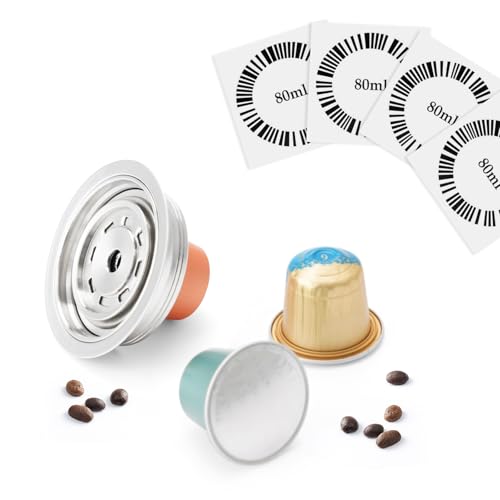
Game-Changer - Stainless Steel Original Pod for Vertuo Machine: NEW & UNIQUE Design for Nespresso Vertuo podsor other 3rd party original pods, place OriginalLine pod into our metal converter and use in Vertuoline-system machine. No more missed the tasty original pods. Add value to your machine by increasing options of coffee capsule. Right now you can enjoy the various coffee flavor.