
Descaling your Vertuo Pop takes about twenty minutes and prevents mineral buildup that blocks water flow. You’ll need a Nespresso descaling packet, seventeen ounces of water, and a container. The tricky part? Pressing and holding the button for seven seconds until orange LEDs blink rapidly—that’s how you enter descaling mode. Then you’ll run the solution through, rinse with fresh water, and exit by holding the top button and lever simultaneously. Let the machine cool ten minutes before brewing again. The specifics of each step determine whether you’ll succeed or restart the sequence.
Gather Your Descaling Supplies and Prepare the Machine
Before you start descaling your Nespresso Vertuo Pop, you’ll want to gather everything in one place—because running back and forth mid-cycle defeats the purpose of a clean machine.
Your supply checklist needs one Nespresso descaling packet, 17 oz of water, and an empty container with at least 34 oz capacity. Grab a damp cloth too. Now, here’s the thing about safety precautions: you’re working with descaling solution, so keep it away from your face and hands.
Empty your capsule container and drip tray completely. Remove any used capsule from the brewing chamber. Rinse your water tank thoroughly before filling it with the descaling mixture. For optimal results, descale every 3 months to maintain your machine’s performance and ensure consistently excellent coffee quality.
Plug in your machine and power it on. Close the machine head. Remove the cup support and position your collection container directly under the outlet.
Regular descaling prevents mineral buildup that can impair heating efficiency and alter coffee flavor.
Descaling also helps preserve optimal pressure for consistent extraction.
You’re ready to descale.
A clean group head ensures even water distribution during brewing.

Includes: 2 portioned pouches of descaling solution specially designed for your Nespresso machine

COMPATIBLE WITH ALL VERTUO MACHINES – Designed for use with all Nespresso VertuoLine coffee machines for convenient routine cleaning and maintenance.

12-Month Maintenance Kit: Our package includes 1 bottle of descaling solution, enough for 4 uses, 12 Vertuo cleaning tablets, and 1 reusable Vertuo pod. This kit provides all the necessary tools for maintaining your machine’s performance.
Enter Descaling Mode: The Button and Lever Sequence
Getting your Vertuo Pop into descaling mode requires a specific button-and-lever dance—and honestly, this is where most people get stuck because the sequence feels counterintuitive at first.
Start with your machine head closed and lever released. Press and hold the button for seven seconds until the steady white light vanishes and orange LEDs blink rapidly. That fast orange blink is your green light to proceed. You’ll have 45 seconds to re-enter descaling mode if you need to release and try again.
Now comes the lever timing: turn the lever left to lock, then back right to release. Keep the head closed throughout this motion.
Immediately press and hold the button again for seven seconds. The rapid blinking should continue, confirming Mode entry worked.
Finally, lock the lever left and press the button once to start descaling. You’re in. Remember to use a descaling solution to protect the machine’s internal components and maintain optimal coffee taste. Regular descaling prevents mineral buildup that can impair heating efficiency. Power off safely before beginning the descaling process to avoid any electrical hazards.
Fix Button Timing, LED Blinking, and Sequence Failures
Most descaling attempts fail because you’re pressing the button or moving the lever at the wrong moment—not because anything’s broken.
Why Your Button Timing Matters****
You need to complete five button presses within 3 seconds. Slower presses won’t register. The machine expects rapid, steady input—think machine-gun pace rather than deliberate taps. Ensure the machine head remains unlocked during your entire reset attempt to allow proper sensor recognition. Always unplug the unit before starting any maintenance to avoid electrical hazards. Regularly checking for error codes can prevent unnecessary resets. A proper reset can also clear any lingering error code that may have been triggered by a previous malfunction.
Read the LED Patterns Correctly
Wait for the light to turn solid white before you start pressing. If it’s still blinking, your input won’t take effect. Once you begin the sequence, you’ll see orange blinking as confirmation. That’s your signal you’re on track.
When the Sequence Fails
Don’t assume the machine is broken. Repeat the entire sequence immediately. Make sure your lever sits in the correct position. Open and close the head deliberately. Timing failures happen constantly—persistence beats panic.
Start the Descaling Cycle and Monitor Progress
You’ve nailed the setup—now comes the part where you actually trigger the descaling action. Press and release the button once. That single press initiates everything; the cycle won’t start during setup, only after that button press.
Now watch for these signs that descaling timing is working correctly. The light blinks continuously while solution flows through, and you’ll hear steady noise from the machine. Here’s the thing—this noise matters. When the machine goes silent, your descaling solution has finished running through the system. The first cycle typically lasts approximately 5 minutes and will use all the water in your reservoir.
For progress monitoring, position a 1L container under the outlet before starting. The water level rising in that container confirms the cycle’s actively running. Once silence hits, discard the solution and refill your water tank for the rinse phase ahead.
The high‑pressure pump ensures the solution reaches every internal passage during the cycle. Regular descaling helps prevent mineral buildup that can impair flavor and performance. Proper descaling also protects the heating element from efficiency and, extending the machine’s lifespan.

2-Pack Coffee Descaler and Cleaner - Clean and rinse away residue and oil buildup in your coffee maker with Impresa's Coffee Descaler Solution. Our highly effective solution comes with two 8-ounce bottles - enough for 4 descaling sessions (2 uses per bottle)

EXTENDS MACHINE LIFE: Regular descaling removes mineral deposits and buildup, helping to extend the operational life of your Nespresso Vertuoline coffee maker and maintain optimal performance

ENVIRONMENTALLY SAFE: Our cleaning tablets are specially formulated to clean your machine while being safe for the environment. It's safe for your surroundings and will leave your coffee brewer with a fresh, new taste
Rinse Your Vertuo Pop After Descaling
Now that the descaling solution’s done its job, you’ll want to flush out every last bit of it before you brew coffee again. Here’s the thing: mineral deposits linger in your machine’s internal lines, so thorough rinsing matters.
Empty your water tank completely and rinse it thoroughly. Refill it with fresh drinking water—not descaling solution. Reinsert the tank and place a container under the coffee outlet.
Press the button to start the rinse cycle. Water temperature stays consistent throughout. Expect the rinse duration to take about seven minutes total, with water beginning to flow after roughly two minutes. The procedure ends automatically, so you don’t need to monitor it closely.
Let the machine run automatically until it stops. Empty and rinse your drip tray and capsule container afterward. Wait ten minutes before using your machine again.
Regularly cleaning the pump system helps maintain optimal pressure for consistent espresso extraction. Remember to unplug the unit before any disassembly to ensure safety. A quick visual check of the drip tray after each rinse can prevent overflow and keep your countertop dry.
Run the Final Rinse Cycle
After you’ve run the descaling solution through your machine, you still aren’t done—mineral deposits cling to the internal water lines, so skipping a thorough rinse means they’ll end up in your next cup of coffee.
Now you’re ready for the final rinse cycle. Press the coffee button three times within two seconds to activate it. Light indicators tell you everything: an orange blinking light confirms the rinse has started.
Here’s the thing about rinse timing—water might take less than two minutes to appear, then the cycle runs automatically for about seven minutes total. You’ll see a steady white light when it’s done. The coffee indicator light changes from blinking orange to solid blue to indicate the rinse cycle has finished successfully.
Keep a container under the outlet to catch water. Once complete, empty your capsule container and drip tray, then let your machine dry for ten minutes before brewing. Regularly cleaning the water reservoir helps prevent future buildup. Proper group head flushing removes residual coffee oils that can affect flavor. Regular descaling also maintains flavor and extends the machine’s lifespan.
Exit Descaling Mode and Restart Your Machine
Once that final rinse cycle completes and the white light steadies, your machine’s still technically locked in descaling mode—and you can’t just walk away. You’ll need to manually exit using the button-and-lever sequence: hold your top button and lever simultaneously for 4 to 5 seconds.
Watch your LED diagnostics closely. Orange flashing means descale mode is still active. You’re looking for that light to shift to steady white or green—that’s your signal everything worked.
If nothing changes after 30 seconds of holding, try a full reset instead. Unplug your machine for at least 10 minutes, then plug it back in. Close the lid firmly and press the button. The reset process is quite simple and typically resolves the issue within seconds, allowing normal operation to resume only when descale mode completely clears. Regularly cleaning the water reservoir helps maintain optimal performance and extends the life of your Nespresso machine. Power button placement is usually on the front panel near the LED indicator.
Let the Machine Cool for 10 Minutes Before Brewing
You’ve just finished the longest part—the descaling cycle itself—but you’re not quite ready to brew yet. Your machine still contains warm water and internal moisture that need time to settle. Waiting 10 minutes isn’t arbitrary; it’s a safety and brew readiness requirement Nespresso includes in their manuals for good reason.
Now, here’s the thing: that moisture can affect your first cup if you rush. Wipe down any visible wet spots on the head with a clean cloth while you wait. Check that the indicator light’s steady white—your signal that the machine’s truly ready. This is especially important if you’re planning to brew the Cold Brew Style Intense capsule, which requires precise temperature control for optimal flavor extraction.
If the machine feels unusually hot to the touch, give it a few extra minutes. You’re not just being patient; you’re protecting your machine’s performance and ensuring your next brew tastes exactly right.
Clean the Tank, Tray, and Outlet
While your machine cools down, don’t skip the parts that collect buildup—your tank, tray, and outlet need attention before you descale.
Should You Clean Tank Residue Before Descaling?
Yes. Remove your water tank and rinse it thoroughly with fresh drinking water. If tank residue clings inside, wash it with soapy water, then rinse completely. Refill only after cleaning.
What About Tray Cleaning?
Remove the drip tray and empty any collected liquid. Rinse it thoroughly, washing with soapy water if buildup remains. Dry it completely before reinstalling. Also remove and clean your cup support the same way.
Don’t Forget the Outlet
Place a large container under the coffee outlet. Wipe away coffee residue and mineral deposits carefully. This prevents clogs during descaling. Do not use strong or abrasive cleaning agents when cleaning these parts, as they can damage your machine’s internal components.
You’re now ready to start the actual descaling cycle.
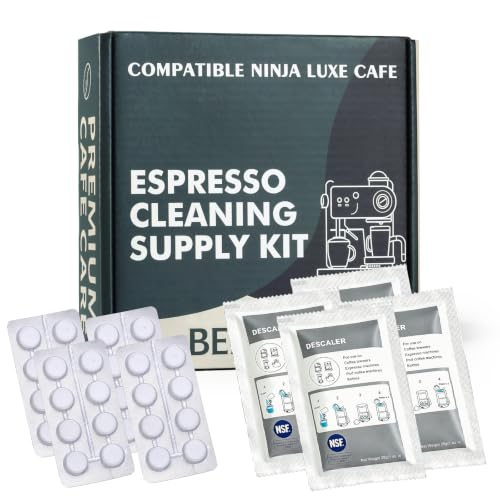
8-MONTH FULL SUPPLY KIT: Complete maintenance set exclusively for Ninja Luxe Cafe espresso machines, enough for 8 months of regular deep cleaning & descaling cycles

Bulk Coffeemaker Decalcifier Tablet: 24 Tablets Work out to a Year Supply or more. Compare to other products like powder, pods, sachet, packets. Choose ACTIVE Cleaning Tablets for better Values

【COMPATIBLE MODELS】Possiave espresso cleaning accessories kit specifically designed compatible with Breville Espresso Machines: Including Barista Express, bes860xl, bes870xl, bes900xl, 800esxl, bes980xl Oracle & More. Does NOT fit BES880 (Barista Touch) or BES990 - Batch 1747 & newer (Does Fit Older Models).
Verify Your Vertuo Pop Is Ready to Brew
Now that you’ve cleaned everything, your machine needs to tell you it’s actually ready to go. You’re probably wondering: how do you know it won’t just sit there doing nothing?
Watch Your Heating Indicator
Plug in your Vertuo Pop and close the machine head firmly until you hear it lock. Press the coffee button. You’ll see the heating indicator start blinking—this means your machine is warming up, typically taking about 30 seconds.
Spot the Steady Light
Once that blinking light becomes steady and solid, your brew readiness is confirmed. That steady light signals the machine finished heating and you’re genuinely ready to brew. Position a container of at least one liter under the coffee outlet before beginning your brew cycle.
Close your machine head completely before you proceed. An unlocked head prevents starting properly, so verify that lever’s in the lock position first.

1️⃣ Smooth & Balanced 150ml Daily Coffee. Enjoy a smooth and balanced 150ml/5oz coffee with rich aroma and light crema. Designed with a smart barcode optimized for Vertuo Pop, Next & Plus machines for accurate recognition and consistent daily brewing.

SIGNATURE COFFEES AND ESPRESSOS: Vertuo Pop+ coffee maker offers a variety of coffee formats in 5 sizes, including 5, 8, 12oz coffees, as well as single and double espressos brewed hot or over ice.

Complete Kit: The Nessus reusable vertuo capsule kit includes a holder, 100 PCS food-grade aluminum Nespresso foil seals, lid opener and a cleaning brush.(Empty pod not included) With this kit, you can easily refill and reuse your vertuo pods, saving money and reducing waste.