
Mineral buildup from hard water silently restricts your machine’s flow and temperature stability—you’ll notice slower brews or inconsistent heat before things break down. You’ll need one official Nespresso descaling packet mixed with 17 oz of water, a 34 oz collection container, and about 15 minutes. Power off, fill your tank with solution, enter descaling mode when the light blinks orange, press once to run the cycle, then refill with fresh water and rinse. Most users descale every three to six months, though heavy users might need monthly attention to keep everything running smoothly.
Why Regular Descaling Keeps Your Vertuo Next Working
If you’ve noticed your Vertuo Next brewing slower or tasting off lately, mineral buildup‘s probably the culprit. Hard water leaves calcium and limescale deposits inside your machine’s pathways, restricting water flow and compromising brew consistency.
Now, here’s the thing: when minerals accumulate, your machine works harder. The heating system struggles to maintain proper temperature. Water delivery becomes uneven, leading to inconsistent extraction and weaker flavor integrity. To combat this effectively, you’ll need one descaling packet mixed with water to dissolve the mineral deposits that have accumulated inside your machine.
Regular descaling every 3 to 6 months—more often in hard water areas—prevents this damage. You’re not just cleaning; you’re protecting machine longevity. A descaled Vertuo Next maintains reliable performance, delivers better-tasting coffee, and reduces operational stress on internal components.
Think of descaling as preventive medicine for your machine. Skip it, and you’re inviting costly repairs down the road. Proper descaling also helps preserve the machine’s pump efficiency and extends the life of the heating element. Regular descaling also supports optimal water pressure for consistent extraction. Mineral buildup can also affect the machine’s internal sensors, leading to inaccurate readings.
Gather Your Descaling Supplies
Before you start the descaling cycle, you’ll want to gather everything in one spot—it’s honestly easier than scrambling mid-process. You’ll need one Nespresso descaling packet (the official brand matters here), plus 17 ounces of water for mixing. Grab a large container—at least 34 ounces—to catch the used solution during both descaling and rinsing phases. Bottle sizing matters because you’re emptying your entire water tank.
Now, empty your capsule container and drip tray before beginning. You’ll also want a damp cloth handy for wiping down afterward. Remember that descaling solution is harmful and you should avoid any eye or surface contact during the process. Having this descaling schedule built into your routine means you’ll stay ahead of mineral buildup without stress.
Descaling solutions often contain citric acid to effectively dissolve calcium deposits. Regular descaling helps maintain coffee flavor and machine longevity. Mineral buildup can cause pressure loss and affect extraction quality, so a consistent descaling routine is essential. Everything prepped? You’re ready to actually start the cycle.

Includes: 2 portioned pouches of descaling solution specially designed for your Nespresso machine

RESTORE COFFEE FLAVOR & AROMA: Our universal descaling solution removes bitter mineral buildup and calcium deposits from heating elements. This ensures your Keurig cleaner process restores the original "day one" taste of your favorite pods and espresso capsules

2-Pack Coffee Descaler and Cleaner - Clean and rinse away residue and oil buildup in your coffee maker with Impresa's Coffee Descaler Solution. Our highly effective solution comes with two 8-ounce bottles - enough for 4 descaling sessions (2 uses per bottle)
Prepare Your Machine for Descaling Mode
Now that you’ve got your supplies ready, you’ll want to get your Vertuo Next into the right starting position—think of it like prepping your workspace before any important task.
Empty and Reset Everything First
Start by powering off your machine completely. Empty both the capsule container and drip tray, then reinsert them. Double-check that no capsule sits inside the machine. These safety checks prevent complications during descaling.
Position Your Lever and Tank
Close the machine head firmly. Lock your lever to the left—this powers the machine on. You’ll see the light stabilize after about 30 seconds. Fill your water tank with the descaling solution mixture and keep it installed throughout preparation. The descaling solution should fill your tank to approximately 17 ounces to ensure proper cleaning effectiveness. Regular descaling helps preserve coffee flavor and extends machine life. Following the safety guide will also reduce the risk of damaging internal components. Before you begin, remember to rinse the water reservoir with fresh lukewarm water to avoid residue buildup.
Set Up Your Workspace
Position a large container (at least 34 ounces) directly under the coffee spout. You’re now ready to enter descaling mode.

EXCEPTIONAL RESULTS: Introducing Tillbrook Coffee Machine Descaler specifically formulated for Breville—the best choice for removing hard water buildup, oils, and residue. It’s essential to clean and descale Breville Espresso Machines every 3-4 months to ensure proper functioning of your machine, to enhance the taste of coffee, and to extend the life of the machine.
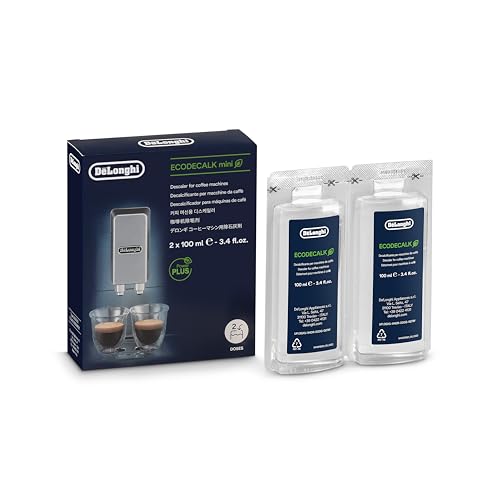
Eco-friendly universal descaling solution that's gentle on your coffee maker

FROM DE'LONGHI. The world-leader in espresso machines.
Start the Descaling Cycle
You’re at the moment where your preparation actually matters—this is where you shift from setup mode into the active descaling sequence.
Why Machine Timing Matters Right Now
You’ve got a limited window to act. Once you’ve entered descaling mode with that **rapid orange blinking, you need to start the cycle within about 45 seconds**. This timing requirement exists for safety compliance and guarantees the machine’s internal sensors stay synchronized with the process. Do not unplug or press other buttons while descaling is active, as this will interrupt the internal synchronization.
Starting the Flow
Place your large container (at least 34 oz) directly under the outlet. Press and release the button once—just a single tap. The machine pumps descaling solution automatically through the system. You’ll notice continuous orange blinking as fluid moves through. The cycle runs silently once it stabilizes, so don’t panic if sound stops.
Never interrupt once you’ve pressed that button. Let it complete its full sequence.
Regular descaling prevents mineral buildup that can impair heating efficiency and affect coffee taste. The pump works more efficiently when mineral deposits are removed.

12-Month Maintenance Kit: Our package includes 1 bottle of descaling solution, enough for 4 uses, 12 Vertuo cleaning tablets, and 1 reusable Vertuo pod. This kit provides all the necessary tools for maintaining your machine’s performance.

EXTENDS MACHINE LIFE: Regular descaling removes mineral deposits and buildup, helping to extend the operational life of your Nespresso Vertuoline coffee maker and maintain optimal performance

ENVIRONMENTALLY SAFE: Our cleaning tablets are specially formulated to clean your machine while being safe for the environment. It's safe for your surroundings and will leave your coffee brewer with a fresh, new taste
Flush Out the Solution With a Rinse Cycle
Once that descaling solution stops flowing and your machine goes quiet, you’ve cleared the first hurdle—but you’re only halfway through the cleaning process. Now comes the rinse cycle, which flushes out all that leftover descaling residue using fresh water.
Empty your collection container and refill your water tank completely. Position a clean container under the spout—you’ll need at least 34 ounces of container capacity to catch everything. Keep the machine in descaling mode and press the button once to start.
Watch the light reset and blink as fresh water runs through the system. The machine stops automatically when finished. Discard all waste disposal water afterward—never reuse it.
Regular maintenance ensures optimal performance and longevity of your Nespresso Vertuo. You’re ready to finish cleanup next.
A successful rinse also helps prevent scale buildup that can affect future brewing. proper capsule holder cleaning extends the life of the machine.

Nespresso Capsule Recycling Container Black - Container for Used Capsules.

Compatibility: Water tank lid cover replacement part for Nespresso Krups Vertuo Next XN9105 XN910B XN910C XN910N XN911B coffee makers

Confirm Descaling Is Finished
How do you know when your Vertuo Next has actually finished descaling? The greenlight status is your main confirmation—a steady green indicator means you’ve successfully exited maintenance mode.
Watch for that solid green light instead of orange blinking. Once you see it, press the button and lever together for 3 seconds to fully exit the service cycle. Your safety indicator status shows the machine has cooled down properly.
Now check your water level in the tank—it should be empty or nearly empty after the rinse cycle runs through. Let the machine rest for 10 minutes before attempting any brewing. This cooling period protects internal components.
After resting, your Vertuo Next should respond normally to button presses with standard brewing speed and proper capsule fit. You’re ready to brew fresh coffee.
Regular descaling also helps preserve the machine’s mineral buildup prevention, ensuring consistent flavor and longevity.
quick power‑on ensures the machine is ready for use promptly after descaling.water hardness should be monitored regularly to prevent future scaling issues.
Troubleshoot If Something Goes Wrong
Even when you’ve nailed the descaling process, your Vertuo Next might throw you a curveball—maybe the orange light won’t blink, the cycle stops halfway through, or nothing happens when you hold the button.
Why the light signal isn’t showing up
Here’s the thing: lever positioning matters enormously. Confirm your head is closed, lever unlocked, and you’re holding the button seven seconds. If that orange blink still doesn’t appear, you likely need a firmware update through the Nespresso app. For optimal safety, always power down the machine before attempting any troubleshooting.
When flow blockage stops the cycle mid-process
A clogged descale path kills momentum fast. Remove your water tank and clean the internal pipes thoroughly. Pod removal beforehand prevents complications. Ensure your container capacity hits at least 34 ounces before restarting.
Fix rinse timing issues
After solution runs through, refill with fresh water and press once. Let the machine stop automatically—don’t force it.
Regular descaling prevents mineral buildup that can cause slow brewing and off‑flavors. Consistent daily flushing helps keep the group head clear of coffee oils.

ECO FRIENDLY OPTION: Our Vertuo descaling kit is different from traditional liquid descalers. It contains concentrated citric acid powder specially formulated for Vertuo machines—just add water before use. No plastic bottles, no unnecessary packaging. It’s eco-friendly, cost-effective, and helps restore the fresh, rich taste of your coffee. Clean smarter, save more, and reduce waste—without compromising performance.

EXCEPTIONAL RESULTS: Introducing Tillbrook Coffee Machine Descaler specifically formulated for Nespresso Vertuo—the best choice for removing hard water buildup, oils, and residue. It’s essential to clean and descale Nespresso Vertuo Machines every 3-4 months to ensure proper functioning of your machine, to enhance the taste of coffee, and to extend the life of the machine.

Effective and Safe Descaling Solution: Specially formulated for Nespresso machines to ensure thorough descaling without damaging your coffee maker. Perfect for all Nespresso models.
When to Descale Again
Your Vertuo Next’ll tell you exactly when it needs descaling again—you just have to listen to what it’s saying.
The alert timing depends on two things: your water’s hardness and how often you brew. Hard water accelerates mineral buildup markedly, meaning you’ll descale sooner than someone with soft water. Heavy users might descale every month or two, while occasional brewers stretch it longer.
Don’t ignore performance changes either. Slower flow, smaller cup volumes, or temperature swings signal scale accumulation before any alert appears.
After you descale, follow the rinse protocol carefully. Let the machine rest ten minutes post-cycle, then track alert timing from there. Your next descaling schedule builds from actual usage patterns you establish moving forward.