
Find the model sticker on your Breville (e.g., BES870, BES500) and note the three‑digit code. For a Barista Express, power off, hold the Program button about three seconds until you hear three beeps and the lights flash, then release to restore pressure, temperature, and shot volumes. For a Bambino, enter standby, then press 1‑Cup + 2‑Cup together for ten seconds (five on the Plus) until the lights flash. On an Oracle, power off, hold 1‑Cup while pressing Power for three seconds, select “rSEt” on the LCD, and confirm. After the reset, run a test shot to verify defaults and you’ll uncover how to re‑program volumes.
Identify Your Breville Model & Choose a Reset
One of the first steps is pinpointing your Breville model, because the reset procedure varies by series. Locate the sticker underneath the machine or behind the water tank; it displays the model code, such as BES870 for the Barista Express, BES500 for the Bambino Plus, or BES990 for the Oracle Touch. The three digits after “BES” identify the core model, while trailing letters denote color (BSS) or regional suffixes (1BNA1, 4IAN1). Record the exact code before you decide on a reset path, because model selection determines whether you’ll use a menu‑driven factory reset, a grinder‑automation sequence, or a manual button combo. Verifying the code eliminates the risk of applying an incorrect procedure. Ensure you remove the water tank to access the label code before checking the model. Regularly cleaning the group head and steam wand prevents residue buildup that can interfere with reset functions. Follow the monthly descaling schedule to avoid mineral deposits that may affect the machine’s electronics. Properly setting the water temperature helps maintain consistent brew quality.
Breville Barista Express Reset – Program Button Method
Wondering how to restore your Barista Express to its original settings? First, power off the machine completely. Then press and hold the Program button for about three seconds, or until you hear three beeps and see the panel lights flash. Release the button promptly after the third beep. This sequence returns the espresso pressure and water temperature to factory defaults and restores the default shot volumes for the 1 CUP and 2 CUP buttons. After the reset, run a test shot to verify that the water temperature and espresso pressure are back to baseline. If the machine doesn’t beep, double‑check the power supply, guarantee the button is fully depressed, and repeat the hold‑until‑three‑beeps step. If issues persist, consider descaling or servicing the flow meter. One‑cup button delivers one ounce of water. Regular deep cleaning helps maintain optimal performance and prolong the machine’s lifespan. For best results, follow a descaling schedule every 2–3 months to prevent mineral buildup. Proper grind consistency ensures balanced extraction and enhances flavor.

EXCEPTIONAL RESULTS: Introducing Tillbrook Coffee Machine Descaler specifically formulated for Breville—the best choice for removing hard water buildup, oils, and residue. It’s essential to clean and descale Breville Espresso Machines every 3-4 months to ensure proper functioning of your machine, to enhance the taste of coffee, and to extend the life of the machine.

ENJOY THE FULL TASTE OF YOUR COFFEE: The descaling process removes any mineral build-up and limescale, keeping your machine running smoothly and producing coffee each time so you can enjoy its full taste again

OFFICIAL BREVILLE CLEANING TABLETS: Extend your espresso machine's functionality and prolong its life by turning to the brand you trust; Use the cleaning tablets designed and manufactured by Breville
Breville Bambino Reset – Standby + Double‑Shot/Steam Buttons
If you need to restore the Bambino’s shot‑volume settings, start by putting the machine into standby—press the 1 Cup and Hot Water buttons together for about half a second on the Bambino, or the 1 Cup and Steam buttons for roughly five seconds on the Bambino Plus. Once standby entry is confirmed, the ready‑state lights extinguish, indicating the brew buttons are inactive. Then press and hold the 1 Cup and 2 Cup buttons simultaneously: ten seconds on the Bambino, five seconds on the Plus. The machine will emit a volume flash sequence—three rapid flashes—to signal that the default 1‑Cup and 2‑Cup shot volumes have been restored. After the flash, the lights return to steady ready mode, completing the reset. The machine will return to factory defaults when both lights are off and you hold the opposite buttons for about five seconds factory reset. This process mirrors the user‑friendly approach highlighted in the Breville vs DeLonghi comparison, where Breville’s emphasis on precise temperature control and versatile grind settings offers greater extraction consistency. Proper pressure regulation ensures the water forces through the coffee puck at the optimal nine bars for a rich espresso crema.

Complete Espresso Tool Set: Our 7-piece 54mm espresso accessories kit comes with a espresso tamper, WDT tool (needle stirrer), espresso tamping station, coffee distributor, dosing funnel, reusable puck screen and brush. The coffee tamper set covers every pre-brew step from grinding to tamping, easily brew consistent, café-grade espresso at home for your daily coffee routine

The Breville Knock Box 10 is the refined match for your espresso machine; Complete your collection of coffee bar accessories with this handy tool; Strike portafilter against the durable knock bar for quick, easy and mess-free disposal of coffee puck

Crafted with the finest materials, our espresso WDT tool boasts a combination of food-grade hard plastic and 304 stainless steel needles (0.4mm thickness). The result is a durable and top-tier quality accessory for coffee enthusiasts
Breville Oracle & Touchscreen Reset – Power + 1‑Cup + Select
When you need to access the Oracle or Oracle Touch’s advanced menu for a factory reset, start with the machine powered off, then press and hold the 1‑Cup button while you also hold the Power button for three seconds. The LCD will show “rSEt,” confirming entry. Rotate the SELECT dial to navigate the menu navigation; the reset option appears as “rSEt.” Press SELECT to confirm, then follow the on‑screen prompts to clear all user settings and restore factory defaults. This pathway also lets you initiate a firmware update if a newer version is available, ensuring the machine runs the latest software. After confirming, the machine reboots, and all personal preferences are erased, leaving a clean configuration for future use. Ensure the machine is completely powered down before beginning the reset sequence. The compact design of Nespresso machines mirrors the streamlined user experience of the Breville reset process, emphasizing minimal effort for consistent results. Remember to pre‑heat briefly before using the machine to achieve optimal brewing temperature. For a smoother crema, consider using a nitrogen‑infused brewing method.

Compatibility: Compatible with 58mm Breville 58mm Double Boiler Sage,Oracle, Oracle Touch.
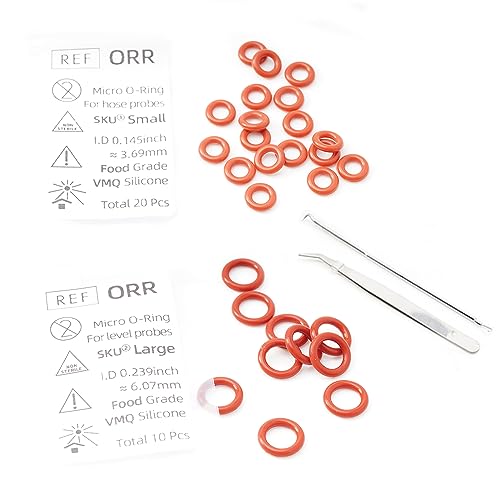
Made of food grade silicone material, durable and functional. Exquisite and exquisite, highly match the original.

BETTER TASTE: Get better tasting espresso & cappuccino by removing oily buildup inside your machine and keeping its parts clean
Breville Reset Troubleshooting – Common Issues & Fixes
After accessing the advanced menu and confirming the factory reset, many users encounter lingering problems that a simple reset doesn’t fix. First, verify the power cord is undamaged and seated firmly; test the outlet with another device or flip the circuit breaker if the machine remains unresponsive. Next, guarantee the water reservoir is full, properly aligned, and reseated to clear any air lock. Run hot water without a portafilter to detect pump blockage, and perform a black‑flush or descaling cycle if flow is slow. For steam wand issues, inspect the tip for milk residue, purge with a wet cloth, then clean using hot water and a narrow brush or needle; remove the tip for stubborn clogs. Finally, lock the portafilter fully, clean the grouphead and gasket, and if faults persist after these steps, consider professional service. Ensure the LCD display is functional before starting the reset process. Understanding the role of the portafilter helps diagnose extraction issues quickly. Regularly descaling with a citric‑acid solution prevents mineral buildup that can impair pump performance. Maintaining a consistent water hardness level also extends the machine’s lifespan.

POWERFUL DESCALING SOLUTION: Our advanced coffee descaler and cleaner removes mineral buildup and tough limescale, ensuring optimal performance of your Breville espresso machine or coffee maker. Say goodbye to clogged lines and diminished taste.

EFFECTIVE & FAST ACTING: The cleaning tablets remove stale coffee residues from your machine and the filters reduce impurities of water. Specially formulated for all Breville coffee makers

【COMPATIBLE MODELS】Possiave espresso cleaning accessories kit specifically designed compatible with Breville Espresso Machines: Including Barista Express, bes860xl, bes870xl, bes900xl, 800esxl, bes980xl Oracle & More. Does NOT fit BES880 (Barista Touch) or BES990 - Batch 1747 & newer (Does Fit Older Models).
Re‑program Shot Volumes After a Breville Reset
Although a factory reset restores the default 1‑Cup and 2‑Cup volumes, you can immediately reprogram them to match your preferred yields. First, place the machine in standby and initiate a volume calibration: hold the 1‑Cup and 2‑Cup buttons together for about ten seconds until the lights flash three times (Bambino) or press and hold Program until the panel flashes (Barista Express). Release to enter programming mode. Select the button you want to adjust; the machine begins extraction. Use precise button timing to stop the shot at the exact yield—press the same button again when the desired volume appears in the cup or on a scale. The machine stores this stopped volume as the new preset, beeps to confirm, then repeat for the second button. Verify consistency with a test shot before finalizing. Check the brew pressure to ensure the grind is appropriately set before programming. Semi‑automatic control offers users the flexibility to fine‑tune each shot while still benefiting from automated pump pressure. Proper water temperature is essential for extracting balanced flavors and should be monitored during the calibration process. A consistent espresso grind size helps maintain optimal extraction and crema formation.

53mm precision base, compatible with tapered 54mm Breville portafilter baskets, including Barista Express, Barista Pro, Barista Touch, Bambino Plus, Infuser, and Duo-Temp Pro. NOT compatible with 54mm Sage The Bambino Basket.

The Breville Temp Control Milk Jug includes an integrated thermometer indicator strip to help you texture milk to the optimum temperature range; Upgrade your cappuccinos, lattes and cortados

MANUAL HAND-TEXTURED MICROFOAM: The powerful steam wand included with this cappuccino and latte machine is designed to quickly turn milk into smooth, flavorful microfoam for latte art at home