
You’re probably seeing the red flash because the machine sensed a problem—usually a water‑tank issue, a jammed capsule, or a sensor alert. Here’s the thing: a slow blink means it wants you to desccale, while a fast blink points to a loose or cracked tank, a stuck pod, or overheating. Now, unplug, wait ten seconds, reseat the tank firmly, clear any debris, and run a water‑only cycle; if the blink persists, a quick factory reset or a deeper service check will sort it out. Keep moving forward, and you’ll uncover the exact fix you need.
What the Red‑Blinking Light Means on Your Nespresso
One of the most common things you’ll see is a slow‑blinking red light, and it usually means the machine needs descaling. You’re probably wondering why that happens; the answer is simple: mineral buildup clogs the water path, so the descaling sensor stays in warning mode. The design sensor connectivity monitors flow, and when scale blocks it, the sensor reports a pressure sensor malfunction, flashing the red light.
Now, if the light blinks faster, it often points to a water‑tank issue. A loose or cracked tank breaks the connection, and the sensor can’t tell the machine there’s enough water. Reseating or refilling the tank usually clears the alert.
All right, check the capsule chamber next. A stuck capsule or debris can trigger the same red warning because the pressure sensor detects abnormal resistance. Clean the chute and realign the capsule, then the light should stop.
Takeaway: The red blink is a diagnostic cue—first look for scale, then tank placement, and finally capsule blockages. Ready to try descaling? Descaling process is recommended to restore optimal performance.
Regularly cleaning the group head and portafilter, as described in the De’Longhi guide, helps prevent mineral buildup that can trigger similar alerts. Regular descaling extends machine longevity.
Power‑Cycle the Nespresso to Clear a Red Blinking Light
If your Nespresso keeps flashing red, you’re probably wondering whether a quick power‑cycle can fix it. the’s the thing: cutting the power, waiting a few seconds (or up to ten minutes for a deeper reset), then plugging it back in often clears those temporary electronic glitches.
What’s the simplest reset cycle tip?
Unplug the machine, wait ten seconds, plug it back, and turn it on. If the light stays steady, you’re good. If it blinks again, try a deeper reset: wait ten minutes, then press and hold the power button for ten seconds while still unplugged.
Do I need a button reset after power‑cycling?
Some Vertuo models require a button reset after the basic cycle. For a Vertuo Next, open and close the head, then tap the button five times in three seconds. This extra step often clears lingering errors.
Takeaway: A quick unplug‑plug is your first line of defense; add a button reset if the red blink persists. Next, check the water tank placement if the problem remains. Check the water tank is full and properly seated. Remember to follow the safe opening procedure outlined in the maintenance guide to avoid damaging internal components.
Re‑Seat the Water Tank Properly to Stop the Blink
How can a loose water tank make your Nespresso flash red?
You’re probably wondering why the light blinks, and the answer lies in tank alignment.
A mis‑seated reservoir blocks the sensor check, so the machine thinks there’s no water.
All right, remove the tank and give the base a quick wipe.
Inspect for cracks or debris, then refill to the max line—about 1 L for most models.
Press the tank down firmly until you hear a click; that’s the lock confirming proper alignment.
Now restart brewing.
If the red pulse stops, you’ve solved the problem.
Otherwise, the sensor may need a deeper check, but at least you know the tank is correctly seated.
Takeaway: Proper tank placement completes the sensor check and stops the blink.
Next, you might want to verify the capsule chamber isn’t jammed.
Regular descaling prevents mineral buildup that can affect sensor accuracy, ensuring consistent performance.
descaling solution helps keep the internal components clean and the water flow unobstructed.
The heating element rapidly brings water to the optimal brewing temperature, which is essential for extracting the full flavor from each capsule.
Descaling also removes mineral deposits that can interfere with the water‑level sensor’s detection.
Fix Common Capsule‑Chamber Jams and Lever Issues
You’re probably wondering why the red light stays on after you’ve seated the water tank correctly. The lamp usually means a capsule‑chamber jam or lever problem. First, turn the machine off, unplug it, and let it cool for a few minutes. Then open the lever gently and look for a bent pod, coffee grounds, or broken fragments. Use a thin plastic tool to nudge a stuck capsule back toward the bin, and pull out any debris.
How do I clean the lever?
Now, wipe the lever with a damp cloth and brush away any grounds from the puncture spikes. A quick lever cleaning removes residue that can cause resistance.
Why does the lever stay misaligned?
Here’s the thing: an overfilled used‑capsule container or a mis‑seated pod can keep the lever from fully closing. Check that the capsule sits flat and centered, then push the lever until it clicks. If it still stops short, the top mechanism may be shifted.
Takeaway: Removing obstructions and ensuring lever alignment restores normal operation. Next, test a water‑only cycle to confirm the jam is gone.
If the machine still shows a red blink after these steps, the diffuser plate may be clogged with coffee grounds, requiring deeper cleaning. The high‑pressure pump creates a 19‑bar pressure that forces water through the coffee, so any blockage can disrupt this process. Regular descaling helps prevent mineral buildup that can also affect the brew head performance.
A thorough group‑head flush each week also removes coffee oil residue, preserving flavor quality and extending equipment life.
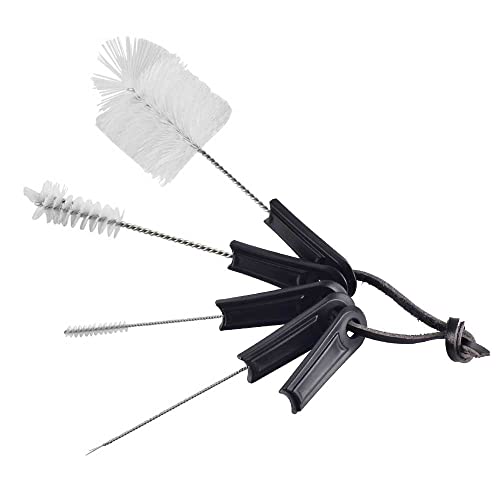
Espresso Brush Pack - Including 5pcs espresso machine cleaning brush tools and 1pc espresso portafilter basket remover tool, for cleaning any space of your espresso machine.

14-pack: Various Size Stainless Steel Straw Brush*10, Coffee Brush*1,long grip handle brush with spoon*1, short original cleaning tool brush*1,coffee art stencils pen*1
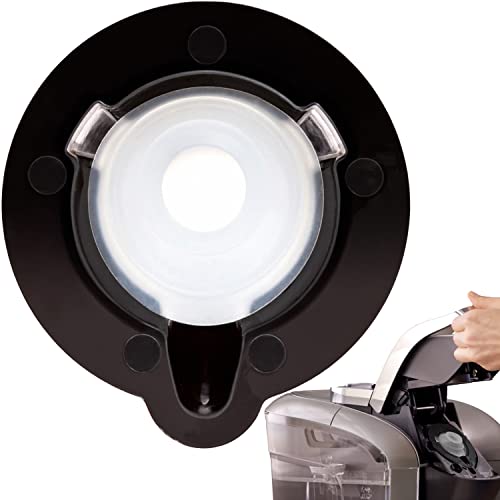
Efficient Brewing Solution: IMPRESA's Brewer Needle Cleaning Tool enhances your coffee maker's performance by eliminating clogs and ensuring a seamless brewing experience. Compatible with Keurig 2.0 brewers, this coffee maker needle cleaner simplifies maintenance
Cool‑Down Overheating Nespresso and Prevent Future Blinks
When the red light blinks, it’s usually the machine’s way of saying it’s overheating, not that the capsule is jammed. You’ve probably wondered why it happens after a few quick brews. The answer is simple: the heating element stays hot and the machine’s thermal sensor shuts it down to protect itself.
How do you cool it down quickly?
Now, turn the unit off, open the head, and let the heat escape. Unplug for 10‑15 minutes if the light stays on. A 30‑minute pause works for serious cases. Think of it like letting a hot pan rest before touching it. Regular descaling helps maintain optimal temperature control and prevents sensor drift. Regular descaling with a proper descaling solution removes mineral buildup that can cause overheating.
What habits prevent future blinks?
Here’s the thing: keep vent cooling routines in mind. Clear dust from the vents, give each brew a 1‑minute break, and avoid stacking the frother while brewing. Proper airflow optimization keeps internal temperature stable, just like a laptop fan clears heat. Slow blinking usually indicates a charging or but issue, so ensure the device is fully charged before use.
Takeaway
You can stop the red warning by pausing, unplugging, and maintaining clean vents. Next, check your brew cadence and water flow to keep the machine happy. channeling detection helps you spot uneven extraction early, ensuring a smoother shot and reducing overheating risk.

Includes: 2 portioned pouches of descaling solution specially designed for your Nespresso machine

RESTORE COFFEE FLAVOR & AROMA: Our universal descaling solution removes bitter mineral buildup and calcium deposits from heating elements. This ensures your Keurig cleaner process restores the original "day one" taste of your favorite pods and espresso capsules

2-Pack Coffee Descaler and Cleaner - Clean and rinse away residue and oil buildup in your coffee maker with Impresa's Coffee Descaler Solution. Our highly effective solution comes with two 8-ounce bottles - enough for 4 descaling sessions (2 uses per bottle)
How to Identify and Resolve a Slow‑Blink Descaling Alert
Why does your Nespresso flash a slow red blink instead of brewing coffee? You’re seeing a regular one‑flash‑every‑2‑seconds pattern, which means the machine is warning you about scale buildup. Hard‑water minerals have collected inside the tubes and heating element, throttling water flow and pressure.
Now, how do you confirm it’s a descaling alert? First, check the tank is seated and filled. Then notice weak pours or incomplete cycles. If you haven’t descaled lately, the alert is likely legit.
Here’s the thing: start the descaling routine. Unplug, mix 500 ml of Nespresso‑approved solution with 1 L water, pour into the tank, and run the machine in descaling mode. After the cycle, flush with two clean‑water runs.
All right, add this to your maintenance schedule. Descale every 3–6 months in hard‑water areas, and the slow blink will disappear. Takeaway: a slow red blink signals scale buildup; a quick descaling and regular maintenance keep your espresso flowing smoothly. Sticky residue on the brew head can also cause the same red‑light error. Regular descaling prevents mineral accumulation and extends the lifespan of your coffee machine. Proper descaling also protects the heating element from premature wear.
A regular descaling routine also helps maintain consistent brew flavor over time.

Compact construction

Effective and Safe Descaling Solution: Specially formulated for Nespresso machines to ensure thorough descaling without damaging your coffee maker. Perfect for all Nespresso models.

DESCALING KIT Set of 2 descaling kits for Inissia, Pixie, U, Maestria, Gran Maestria, Lattissima, CitiZ, Essenza, Cube, Concept, Expert, Prodigious, Seaco, Siemens, Classic line machines
Full Factory Reset for Vertuo & Original Models
You’re probably wondering why a quick factory reset feels different for Vertuo versus the Original line. Obviously, each family uses its own button dance to clear custom brew settings and restore defaults.
How do I reset a Vertuo?
Turn the machine on, wait for a steady light, open the head and empty the capsule. Close the head, leave the lever unlocked, then press the brew button five times within three seconds. You’ll see orange blinks five times, then a steady white or green light confirms success. Verify no used capsule remains inside before closing the head. This method leverages the capsule format unique to Vertuo machines.
What about the Original line?
Power up, wait for blinking to stop, open the lever to guarantee the chamber’s empty. Hold the Lungo button while you switch the machine off with the power button or unplug it. After ten seconds, plug it back in; rapid blinking shows the reset worked.
Takeaway
Both procedures are model specific, so follow the exact sequence for your machine. If the light pattern doesn’t change, try the steps again a little faster. Next, check whether you need to reprogram cup sizes or move on to troubleshooting a persistent red blink. The reset process also helps to clear any lingering error codes that may have been triggered by a malfunction.
When to Service Your Nespresso or Replace It
If your Nespresso keeps flashing red after you’ve cleaned and descaled it, you’re probably wondering whether a quick service will fix it or if it’s time to replace the machine.
When does service make sense?
You still get heat and water, and the repair cost stays below a new unit. Warranty options often cover sensor or pump fixes, so you’ll save money. A smooth repair also keeps resale value higher, because buyers trust a well‑maintained machine. Regular maintenance prevents intolerable coffee quality issues. Quick power‑on further reduces wear on components. Proper water temperature management during brewing helps maintain consistent flavor and protects internal components.
When should you replace it?
Heating or pump failure repeats even after a professional fix, or the machine is out of warranty and the quote exceeds the price of a fresh model. Older units with multiple repairs lose resale value fast, making a new purchase smarter.
Bottom line
If a simple fix restores function, service it. If faults return quickly or costs climb, replace it and protect your resale value.
Now, check your warranty and get a repair quote before deciding.

This OEM repair kit can help you to fix some of the most common Rancilio Silvia problems.

Replacement for SP0102952 - MacMaxe NTC base assembly kit designed as a compatible replacement for Breville Barista Touch BES880 machines using part number SP0102952.

Package: This kit includes 2 complete sets of O-ring(30 pcs), this versatile kit has you covered