
You’re wondering if the Vertuo’s barcode system actually works—and it does, but only when you nail the setup. Fill your water tank to max, plug into a grounded outlet, and wait for that steady light (15-30 seconds). Insert your capsule dome-side down, silver foil up, lock the head until it clicks, center your cup underneath, then press the button once. The machine reads your capsule’s barcode and handles everything automatically. That’s honestly it—water, capsule, cup, button. Everything else flows from getting those four things right, and you’ll uncover exactly why in the detailed steps ahead.
Get Your Vertuo Machine Ready: Water, Power, and Heat-Up
Before you brew your first cup, you’ve got to set up three things: water, power, and giving the machine time to heat.
What’s your machine selection and power check?
Start by plugging your Vertuo into a grounded outlet on a flat, stable, heat‑resistant surface. Make sure nothing’s blocking the capsule container or cup support. Your power check confirms everything’s positioned safely before you proceed. Operate the machine only with cup and capsule container in place for safety.
Getting water in the tank
Rinse the water tank with fresh water first. Fill it to the maximum level with drinking water. Refit it securely onto your machine.
The heat‑up wait
Turn on your machine. Close and lock it to begin heating. Most Vertuo models reach temperature in 15–30 seconds. You’ll know you’re ready when the light becomes steady and solid—that’s your green light to brew. The proprietary capsule system ensures each brew locks in flavor and freshness. Regular descaling prevents mineral buildup that can reduce pressure and affect taste. Consistent descaling helps maintain optimal brew quality over time.

Water Tank & Lid Combo: includes both the water tank and the lid cover, providing a complete and cost effective replacement solution; The lid helps prevent dust and debris from entering the tank while keeping the water fresh, ensuring your coffee machine continues to function efficiently while maintaining its sleek and modern appearance

Pacakge Contents - Includes coffee machine water tank with lid, check the items after receiving. Cost-effective solution to extend your machine’s life.
Insert a Vertuo Capsule the Right Way
Getting the capsule positioned correctly is essential because your machine reads the barcode and adjusts brew settings automatically—but only if you’ve oriented it properly. You’ll want to release and fully open the machine head before inserting anything.
Now, here’s the thing: capsule orientation matters hugely. Insert your Vertuo capsule dome-side down into the chamber. The silver foil lid must face upward so the piercing needle can engage it correctly. Set it flat without forcing or tilting it. Only Nespresso Vertuo capsules are compatible with this machine, as classic capsules will not work.
Once you’ve positioned the capsule properly, push the head down until it clicks. Lock the lever into place. Your machine will then read that barcode, determine your brew settings, and you’re ready to press start. Regularly rinse the water reservoir to maintain optimal coffee quality. Proper water temperature control ensures consistent extraction and flavor. A thorough descaling routine prevents mineral buildup and keeps the machine operating smoothly.
Position Your Cup and Choose Your Brew Size
Now that your capsule’s locked in and the machine’s reading your barcode, you’ll want to position your cup so the coffee lands exactly where you want it. Cup alignment matters because misalignment increases splash and overflow risk.
Center your cup directly under the coffee outlet before brewing starts. The barcode on your capsule determines your brew volume—Espresso, Double Espresso, Gran Lungo, Mug, or Carafe. Your machine recognizes capsule type automatically and adjusts water amount accordingly. If you’re using a larger glass for gran lungo or mug-size coffees, you can slide the shelf upward using the magnetic strip to accommodate taller cups.
Match your cup size to that brew volume. Mug-size capsules produce up to 230 mL, so choose accordingly. Taller cups might require removing the cup support entirely. Verify your cup is empty and large enough before you start. The lower pressure used by Nespresso machines compared to traditional espresso machines results in a different crema texture that many coffee enthusiasts notice. Regular descaling helps maintain this texture. descaling performance. Regular descaling prevents mineral buildup that can affect brew quality.
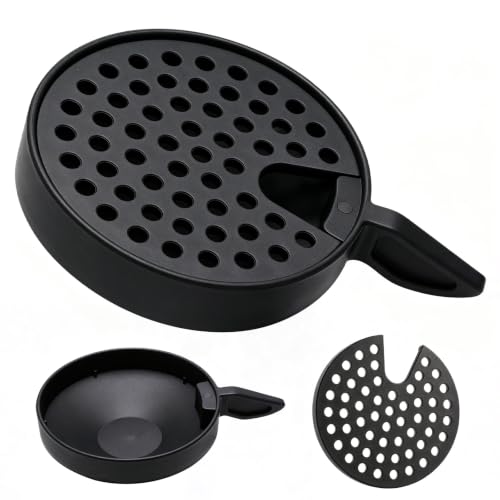
Perfect Compatibility - Specifically designed to replace parts MS-624960 and MS-624913 for Krups Nespresso Vertuo Next coffee machines, compatible models XN910B10FB0, XN910B10FB1, XN910510FB1, XN910510FB0, XN911B10FB1, XN910N10FB1.

Large Capacity: Stores up to 40 large or 60 small Vertuo capsules, easily fitting most standard 3-box sleeve sets with extra space. Keep flavors organized and reduce refill frequency at home or in the office
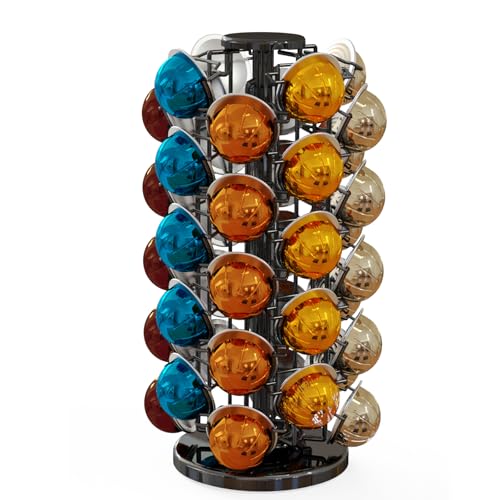
GREAT CAPACITY HOLDS 40 VERTUOLINE COFFEE PODS Simple and elegant look, Keeps your vertuoline pods well organized,Holds up to 40 nespresso vertuo pods and the coffee pod fits very nice in the unique slots.
Start Brewing and Monitor the Process
You’re ready to actually make your coffee—and here’s where things get straightforward. Press the coffee button once to start extraction. The machine won’t brew until your capsule locks securely into place.

NESPRESSO VERTUOLINE VARIETY PACK ASSORTMENT: This Nespresso coffee assortment offers 30 Nespresso Pods in a variety of 3 best-selling coffee blends for the Nespresso VertuoLine System.10 Stormio, 10 Odacio, 10 Melozio

SMOOTH & BALANCED: Through the coffee crema you’ll catch its aroma of delight. Melozio makes a smooth and flavorful black coffee, Americano or long black.

INDULGENT FLAVORS: This assortment of Nespresso Vertuo coffee pods contains a variety of Nespresso capsules: 10 Sweet Vanilla, 10 Golden Caramel, 10 Roasted Hazelnut
What Happens During Brew Timing
Coffee flows automatically after you press the button. The machine reads your capsule’s barcode and adjusts brew timing automatically—no manual tweaking needed. Extraction continues until your programmed cup volume finishes. The flashing indicator stops when the machine is ready to brew, signaling that heating is complete.
The high‑pressure pump delivers water at 19 bar to extract the coffee efficiently. Here’s the thing: you don’t need to do anything while it brews. The machine stops itself when done. If you want a shorter pour, some Vertuo models let you manually stop early.
Keep an eye on that indicator light. Once it steadies, you’re genuinely ready to brew. The OriginalLine system uses a different capsule size and pressure level, which impacts flavor profile. Regular descaling helps maintain this performance over time.
Stop, Top Up, or Eject Your Capsule
Once your brew finishes, you’ve got three options—and the machine gives you full control. You can stop mid‑brew by pressing the coffee button once, which halts water flow and prevents the remaining programmed volume from dispensing. This stops the extraction immediately while maintaining capsule safety inside the machine.
Now, if you want more coffee, press the button again without opening the head. The machine brews the same volume using your original capsule—a handy repeat function that works seamlessly.
Here’s the thing: when you’re ready to eject, turn the lever right to release. The head pops up automatically, and your used capsule drops into the holder. The capsule container holds about four or five capsules depending on brew size, so empty it regularly to prevent overflow. Themanual extraction is required since the capsule falls directly into the holder during this automatic ejection process. Regular cleaning of the water reservoir helps maintain optimal brewing temperature and flavor.
Always ensure the machine is unplugged before attempting any internal maintenance to avoid electrical hazards. Performing a factory reset can also resolve persistent errors.
Why Your Coffee Isn’t Brewing Right
When your Vertuo refuses to brew or spits out weak coffee, something’s blocking the process—and it’s rarely as complicated as it sounds. You’re probably dealing with one of three culprits: an air lock trapping water in the system, residue clogging the needle, or an improperly seated capsule seal.
Start by running a water‑only cycle to clear any air lock. If that doesn’t work, gently shake the machine to dislodge bubbles. Next, inspect your capsule holder and needle—coffee grounds build up there fast and stop extraction dead. If problems persist, descaling removes buildup that may prevent proper machine function.
Make sure your capsule sits fully locked before brewing. A loose capsule seal prevents the machine from reading or piercing properly. Clean the needle area with a soft brush, then try again.
Still stuck? You might need professional service. Regular descaling helps maintain optimal temperature and pressure preventing mineral buildup that can cause these issues.

Includes: 2 portioned pouches of descaling solution specially designed for your Nespresso machine

COMPATIBLE WITH ALL VERTUO MACHINES – Designed for use with all Nespresso VertuoLine coffee machines for convenient routine cleaning and maintenance.

12-Month Maintenance Kit: Our package includes 1 bottle of descaling solution, enough for 4 uses, 12 Vertuo cleaning tablets, and 1 reusable Vertuo pod. This kit provides all the necessary tools for maintaining your machine’s performance.
Rinse and Descale Your Vertuo Between Uses
Regular rinsing and descaling aren’t optional maintenance—they’re what keeps your Vertuo extracting rich, balanced shots instead of weak, bitter ones. You’re probably wondering when to do each one and why they matter so differently.
Here’s the thing: rinsing flushes residue after every brew or cleaning cycle. Fill your water tank with fresh water, place a large container under the spout, and press the button. The cycle runs automatically for up to five minutes.
Descaling tackles mineral buildup from water hardness. Mix one packet of Nespresso descaler with 0.5 L of water, refill your tank, and enter descaling mode by pressing the button three times within two seconds. The machine empties itself over about twenty minutes. Before you start the descaling process, lift the lever to eject any remaining capsule from the machine.
After descaling, rinse once more with fresh water to remove chemical residue. Your capsule maintenance routine should include both steps monthly to keep extraction perfect. Regularly checking water hardness helps prevent excessive scaling and maintains flavor consistency. Using a water softener can further reduce mineral deposits and extend the time between descaling cycles.
Empty the Capsule Container and Drip Tray
Your Vertuo’s been pulling great shots, but now you’re noticing the capsule container‘s getting full—and you’re wondering if that matters or if it’ll just keep working anyway. It does matter.
Used capsules eject automatically after brewing into that container on your machine’s left side. You can fit around four to five capsules before it’s full, depending on brew size. Once it reaches capacity, you’ll get overflow and mess.
Here’s the thing: container cleaning and drip tray maintenance happen simultaneously. Move the lever to release, let the head pop up, then carefully pull out both components together. Before reinstalling, ensure no capsules remain in the machine to prevent any interference with the cleaning process.
Wash everything with soapy water, dry thoroughly with a soft cloth, and reinstall. Regular emptying keeps your brewing area clean and ready for your next cup. Descaling is essential to maintain coffee quality and machine longevity. Power button should be pressed after refilling the water reservoir to ensure the machine is ready for the next brew.
Machine Won’t Start or Stops Mid-Brew: Quick Fixes
If your Vertuo won’t start or cuts out mid-brew, you’re probably thinking the machine itself is broken—but it’s usually something simpler you can fix right now.
Check Your Water Tank First
You’d be surprised how often a loose or empty tank stops everything. Make sure it’s filled with fresh water and seated firmly in the base. Check the connection point for debris blocking error flow—mineral buildup loves hiding there.
Reset Your Sensors
If water’s flowing fine, unplug the machine for 10 minutes. This clears temporary electronic faults and performs a sensor reset. Overheating also triggers shutdowns, so let it cool 20 minutes after heavy use. If the outlet itself isn’t providing stable power, the machine may not restart properly even after the reset period.
Verify Your Head Lock
Open and close the lid firmly. A partially latched head stops brewing instantly. Remove any leftover capsules from the chamber.
Still stuck? A support call‘s your next move.
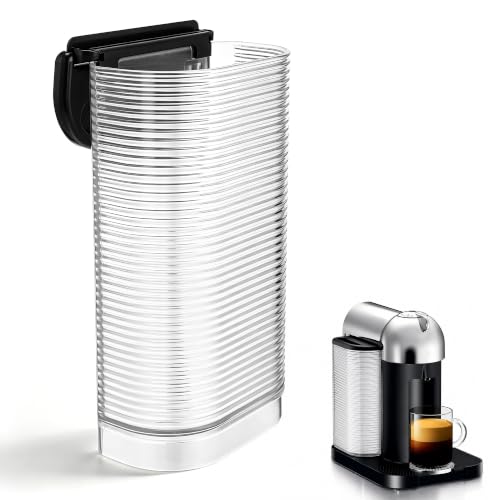
✅ Compatible with Vertuo Models – Compatible with Nespresso Vertuo XN9018, XN901840 & BNV220: This replacement water tank is specifically designed to compatible with Nespresso Vertuo coffee machines, including models XN9018, XN901840, and BNV220. It's also compatible with Breville and Krups Vertuo brewers featuring the curved base design, ensuring a secure, leak free fit every time

Water Tank Reservoir Compatible With Delonghi Nespresso coffee machine,Fit for Vertuo ENV135,ENV135B,ENV135BAE,ENV135GY,ENV135R,ENV135S,ENV135T,Water Tank/container Replacement,for capsule coffee machine
